
SD- and USB-Bootmedia changes with vSphere.Next

With vSphere 7 Update 3 came bad news for all users who use USB flash media or SD cards as ESXi boot device. I have described the changes in the partitioning of the boot device in the article “ESXi Bootmedia – New features in v7 und legacy issues from the past v6.x“.

The discontinuation of support for SD cards and USB boot media put many customers in the uncomfortable position of having to replace their boot media on existing servers. VMware has responded by resuming support for SD cards and USB media under certain criteria.

The problem with these media remains. The wear of these storages was worked around by swapping out write-intensive areas. Since update 7.0 U3c, the setup detects an installation on SD/USB devices and tries to swap critical areas of the OSData partition to more stable media. This for instance includes VM-Tools and Scratch. Starting with the upcoming vSphere.Next release, the entire OSData partition will be swapped out to more robust data storage. However, the question arises here why, when resilient storage media is available, it is not used completely as a boot device right away.

VMware has published details about the changed strategy concerning boot media in KB 85685.

Major Updates to vExpert Application Process

VMware has updated the application process for the vExpert program. The application is now possible all year round. Only during the selection process the portal will be closed for about 2 weeks. This is usually in February for the first half of the year and in the July/August area for the second half of the year.

For more details, check out Corey Romeo’s post at VMware vExpert blog.

If you have any questions about the application process or need assistance, please feel free to contact me or any of the other vExpertPro.

vCenter Server 7.0 Update 3e released

VMware has released a patch update 3e for vCenter. This is a maintenance release and primarily adds updates for vSphere with Tanzu. There are also separate release notes for vSphere with Tanzu.

What’s New?

  • Added Network Security Policy support for VMs deployed via VM operator service – Security Policies on NSX-T can be created via Security Groups based on Tags. It is now possible to create NSX-T based security policy and apply it to VMs deployed through VM operator based on NSX-T tags.
  • Supervisor Clusters Support Kubernetes 1.22 – This release adds the support of Kubernetes 1.22 and drops the support for Kubernetes 1.19. The supported versions of Kubernetes in this release are 1.22, 1.21, and 1.20. Supervisor Clusters running on Kubernetes version 1.19 will be auto-upgraded to version 1.20 to ensure that all your Supervisor Clusters are running on the supported versions of Kubernetes.

Check before update

If you upgraded vCenter Server from a version prior to 7.0 Update 3c and your Supervisor Cluster is on Kubernetes 1.9.x, the tkg-controller-manager pods go into a CrashLoopBackOff state, rendering the guest clusters unmanageable

Read KB 88443 for a workaround.

Test K8s Version

Make sure you’re on a supported K8s version.

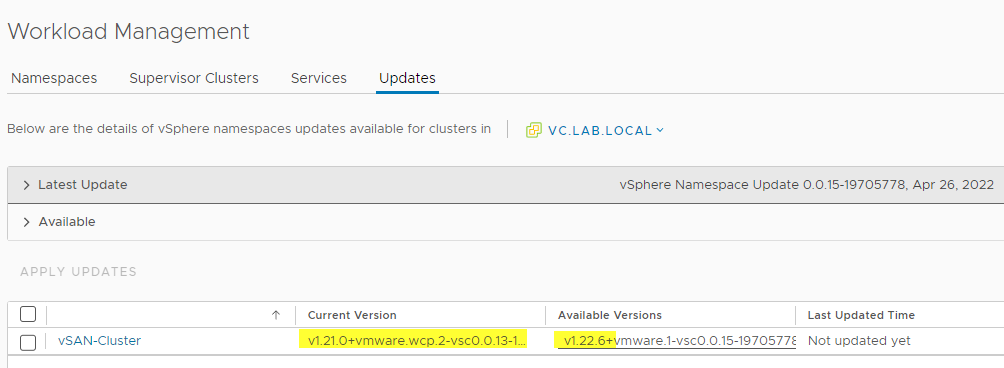
Menu > Workload Management > Subervisor Clusters

The image above indicates we’re already on version 1.21, which is good for an update.

Update

Before updating your VCSA make sure you have a configuration backup! An optional VM snapshot is a good idea too. It might help to revert settings fast in case something goes wrong.

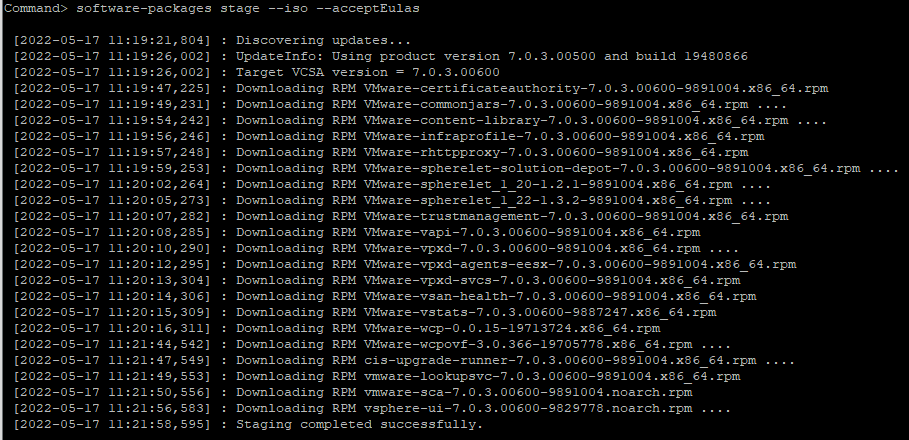
You can either apply the update from VAMI or from the shell. The image below shows an overview of the new packages with this update.

After the update is installed you will have an option to deploy a new Kubernetes version in your Supervisor Control Plane.

An Insight into vSAN-Striping

This article is a result of questions that are asked frequently by my students in vSAN classes. The subject of striping sounds very simple at first, but it turns out to be quite complex once you start going away from the simple standard examples. We shed light on the striping behavior of vSAN objects in mirroring, erasure coding, and for large objects. We also show the different striping behavior before vSAN 7 Update 1 and after.

What is striping?

Striping generally refers to a technique in which logically sequential data is segmented in such a way that successive segments are stored on different physical storage devices. Striping does not create redundancy. In fact, the opposite is true. In traditional storage, striping is also referred to as RAID 0 (note: RAID 0 -> zero redundancy). By distributing the segments over several devices that can be accessed in parallel, the overall data throughput is increased while latency is reduced.

Stripe size or stripe width is the number of segments an object is split into.

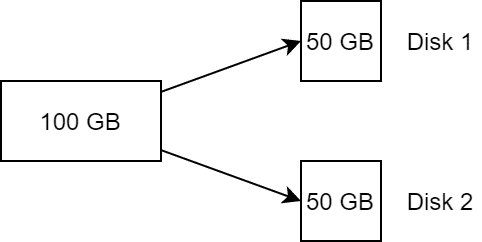
With a stripe width of 2, an object of 100 GB, for example, is split into two components of 50 GB each and distributed across two storage devices. This corresponds to a RAID 0.

Striping with stripe width=2
Continue reading “An Insight into vSAN-Striping”