vSAN Cluster Live-Migration to new vCenter instance

What can be done if the production vCenter Server appliance is damaged and you need to migrate a vSAN cluster to a new vCenter appliance?

In this post, I will show how to migrate a running vSAN cluster from one vCenter instance to a new vCenter under full load.

Anyone who works with vSAN will have a sinking feeling in their guts thinking about this. Why would one do such a thing? Wouldn’t it be better to put the cluster into maintenance mode? – In theory, yes. In practice, however, we repeatedly encounter constraints that do not allow a maintenance window in the near future.

Normally, vCenter Server appliances are solid and low-maintenance units. Either they work, or they are completely destroyed. In the latter case, a new appliance could be deployed and a configuration restore could be applied from the backup. None of this applied to a recent project. VCSA 6.7 was still working halfway, but key vSAN functionality was no longer operational in the UI. An initial idea to fix the problem with an upgrade to vCenter v7 and thus to a new appliance proved unsuccessful. Cross-vCenter migration of VMs (XVM) to a new vSAN cluster was also not possible, firstly because this feature was only available starting with version 7.0 update 1c, and secondly because only two new replacement hosts were available. Too few for a new vSAN cluster. To make things worse, the source cluster was also at its capacity limit.

There was only one possible way out: stabilize the cluster and transfer it to a new vCenter under full load.

There is an old, but still valuable post by William Lam on this topic. With this, and the VMware KB 2151610 article, I was able to work out a strategy that I would like to briefly outline here.

The process actually works because, once set up and configured, a vSAN cluster can operate autonomously from the vCenter. The vCenter is only needed for purposes of monitoring and configuration changes.

Continue reading “vSAN Cluster Live-Migration to new vCenter instance”


VMware vSphere 7.0 U3c released

What happened to vSphere 7.0 U3 ?

vSphere 7.0 Update 3 was initially released on October 5, 2021. Shortly after release, there were a number of issues reported by customers, so on November 18, 2021, all ESXi versions 7.0 U3a, U3b, U3c, as well as vCenter 7.0 U3b were withdrawn from VMware’s download area. VMware explains details of the issue in KB 86191.

The main reason was a duplicate driver i40en and i40enu for Intel 10 GBit NICs X710 and X722 in the system. A check on the CLI returns a result quickly. Only one result may be returned here.

esxcli software vib list | grep -i i40
one result good – two results bad 😉

Hosts with both drivers will potentially have HA issues when updating to U3c, as well as issues with NSX.

What’s new with Update 3c ?

On 27 January 2022 ( 28 January 2022 CET) the new Update 3c was released and is available for download. Besides fixing the issues from previous Update 3 versions (KB 86191), the main feature is the fix for the Apache Log4j vulnerability (VMSA-2021-0028.10).

All users and customers who had installed one of the withdrawn updates 3 at an early stage are highly recommended to update to version U3c.

Continue reading “VMware vSphere 7.0 U3c released”

Running Tanzu Community Edition on a Linux VM – Simple Walkthrough for Beginners

You don’t need an enterprise cluster in order to get an impression of VMware Tanzu and Kubernetes. Thanks to the Tanzu Community Edition (TCE), now anyone can try it out for themselves – for free. The functionality offered is not limited in comparison to commercial Tanzu versions. The only thing you don’t get with TCE is professional support from VMware. Support is provided by the community via forums, Slack groups or Github. This is perfectly sufficient for a PoC cluster or the CKA exam training.

Deployment is pretty fast and after a couple of minutes you will have a functional Tanzu cluster.

TCE Architecture

The TCE can be deployed in two variants either as a standalone cluster or as a managed cluster.

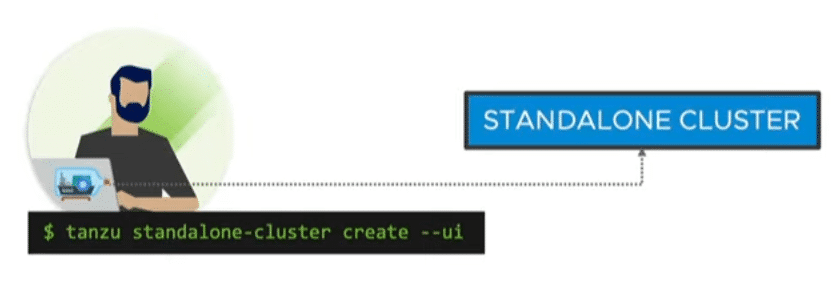
Standalone Cluster

A fast and resource-efficient way of deployment without a management cluster. Ideal for small tests and demos. The standalone cluster offers no lifecycle management. Instead, it has a small footprint and can also be used on small environments.

Source: VMware

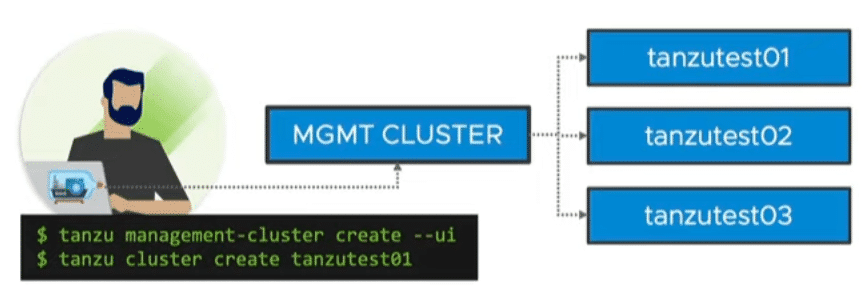
Managed Cluster

Like commercial Tanzu versions, there is a management cluster and 1 to n workload clusters. It comes with lifecycle management and cluster API. Thus, declarative configuration files can be used to define your Kubernetes cluster. For example, the number of nodes in the management cluster, the number of worker nodes, the version of the Ubuntu image or the Kubernetes version. Cluster API ensures compliance with the declaration. For example, if a worker node fails, it will be replaced automatically.

By using multiple nodes, the managed cluster of course also requires considerably more resources.

Source: VMware

Deployment options

TCE can be deployed either locally on a workstation by using Docker, in your own lab/datacenter on vSphere, or in the cloud on Azure or aws.

I have a licensed Tanzu with vSAN and NSX-T integration up and running in my lab. So TCE on vSphere would not really make sense here. Cloud resources on aws or Azure are expensive. Therefore, I would like to describe the smallest possible and most economical deployment of a standalone cluster using Docker. To do so, I will use a VM on VMware workstation. Alternatively, a VMware player or any other kind of hypervisor can be used.

Continue reading “Running Tanzu Community Edition on a Linux VM – Simple Walkthrough for Beginners”

Improve your K8s and Tanzu Skills with VMware ModernApps Ninja

VMware has launched a training portal that allows you to improve your skills and knowledge of Tanzu and Kubernetes. On the portal ModernAppsNinja there are many free trainings that will bring you closer to the ModernApps topic. You will find a variety of courses, labs, tutorials, learning materials and handson tutorials. For example, if you want to prepare for the Certified Kubernetes Administrator (CKA), or the VCP ModernApps, you can easily find the necessary resources and tools there. But also useful tutorials such as how to use VSCode.

https://modernapps.ninja/