
Homelab DNS Server with Raspberry Pi and Bind9

VMware vSphere and other products from the VMware ecosphere highly rely on DNS resolution. Name resolution is crucial to the virtual world and there’s a rule amongst troubleshooters:

“If you’ve ruled out DNS as the origin of your problem – check DNS again.”

In the corporate sector there are usually DNS servers of various types. Either hardware appliances with DNS functionality, or entire Microsoft Active Directory servers. However, if you want to set up a homelab, your office usually has only a small DSL router with a (poor) DHCP server functionality. It is possible to run DNS servers or whole ADS domain controllers inside a VM, but then we have the chicken and egg problem. The VM will start after cluster and vCenter are online. Until then wild things can happen in a vSphere cluster without DNS. So we are looking for a small, energy-saving, inexpensive and configurable hardware solution as DNS server for our homelab. Sounds like the Swiss-Army knive, but it can be easily realized with a Raspberry Pi.

In this article I will explain what you need to build your DNS server and how to configure a subnet for the lab.

Raspi as DNS-server

For this project we don’t need the latest model of the Raspberry Pi. A Raspi 3b model is fine for this purpose and the accessories are also available at low prices.

Raspberry Pi 3b+ / 1GB / 4-Core / 1,4 GHz35 €
Micro SD card 32 GB9 €
Case (optional)8 €
Power supply 2,5A (optional)10 €
HDMI cable5 €
Parts list with average prices as of June 2020

For much less than 100€ you’ll get a tiny server which can also fulfill other tasks like home automization or as ad-blocker pi-hole.

There are a few things to consider. In principle you can power the Raspi via USB. But you have to make sure that the source delivers at least and reliably 1.2A. Power sources with 2.5A are recommended. My first boot attempts failed because my USB power supply did not provide enough power.

The Raspi requires a micro-SD card as permanent boot and storage media. Here you shouldn’t take the cheapest product, but for less than 10 € you can get 32 GB from a trustworthy brand.

Continue reading “Homelab DNS Server with Raspberry Pi and Bind9”

Lockdown Book Project: vSphere 7 – The compendium

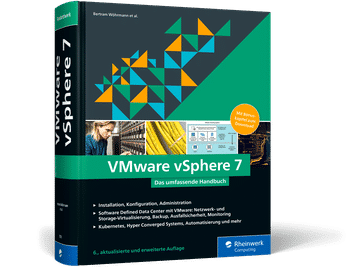
I had the special pleasure of working on a book project as co-author in the past months. It is entitled “VMware vSphere 7 – Das umfassende Handbuch” (“VMware vSphere 7 – The Compendium”, published in German language) and will be published in November by Rheinwerk-Verlag. It is the 6th updated and extended edition of this series.

This book covers a wide range of vSphere 7. From basic architecture to setup and day-2 operations. It helps novice and advanced IT administrators understand the principles of vSphere, network virtualization with NSX-T, vSAN, container workloads, VMware Cloud Foundation, Hybrid Cloud, and SDDC.

My contributions are the completely new written chapters Monitoring and vSAN. The chapter Monitoring is about giving the administrator an overview of the integrated monitoring tools and how to use and interpret them. It also introduces VMware and third-party tools. The vSAN chapter explains the fundamental structure of this storage virtualization and explains the special features of a vSAN cluster in comparison to conventional storage solutions.

It was a pleasure to work on this book with a team of experts.

vSphere with Kubernetes

What’s new in v7U1?

VMware will release vSphere 7 Update 1 shortly. Once update 1 is released users will be able to run Kubernetes workloads natively on vSphere. So far that was only possible for installations with VMware Cloud Foundation 4 (VCF). Beginning with update 1 there will be two kinds of Kubernetes on vSphere:

  • VCF with Tanzu
  • vSphere with Tanzu

VCF offers the full stack but has some constraints regarding your choices. For example VCF requires vSAN as storage and NSX-T networking. NSX-T offers loadbalancer functionality for the supervisor cluster and Tanzu Kubernetes Grid (TKG). Additionally it provides overlay networks for PodVMs. These are container pods that can run on the hypervisor by means of a micro-VM.

In contrast to VCF with Tanzu, vSphere with Tanzu has less constraints. There’s no requirement to utilize vSAN as storage layer and also NSX-T is optional. Networking can be done with normal distributed switches (vDS). It’s possible to use HA-proxy as loadbalancer for supervisor control plane API and TKG cluster API. The downside of this freedom comes with reduced functionality. Without NSX-T it is not possible to run PodVMs. Without PodVMs you cannot use Harbor Image Registry, which relies on PodVMs. In other words: if you want to use Harbor Image Registry together with vSphere with Tanzu, you have to deploy NSX-T.

VCF with TanzuvSphere with Tanzu
NSX-Trequiredoptional, vDS
vSANrequiredoptional
PodVMsyesonly with NSX-T
Harbor Registryyesonly with PodVM, NSX-T
LoadbalancerNSX-THA-proxy
CNICalicoAntrea or Calico
Overlay NWNSX-T

Tanzu Editions

In the future there will be 4 editions of vSphere with Tanzu:

  • Tanzu Basic – Run basic Kubernetes-clusters in vSphere. Available as license bundle together with vSphere7 EnterprisePlus.
  • Tanzu Standard – Same as Tanzu Basic but with multi cloud support. Addon license for vSphere7 or VCF.
  • Tanzu Advanced – Available later.
  • Tanzu Enterprise – Available later.

Links

vSphere Blog – What’s New with VMware vSphere 7 Update 1

vSphere Blog – Announcing VMware vSphere with Tanzu

Cormac Hogan – Getting started with vSphere with Tanzu

VMware Tanzu – Simplify Your Approach to Application Modernization with 4 Simple Editions for the Tanzu Portfolio