
If you’ve missed it read part 1 – Planning phase.
Unboxing
Last Tuesday a delivery notification made me happy. Hardware shipping is on its way. Now it was time to get the cabling ready. I can’t stand Gordian knots of power cords and patch cables. I like to keep them properly tied together by velcro tape. To keep things simple, I’ve started with a non-redundant approach for vSAN traffic and LAN. Still eight patch cables that had to be labeled and bundled. Plus 4 cables for the iPMI interface. I found out later that the iPMI interface will make a fallback to the LAN interface if not connected. That’s nice. Saves me four cables and switch ports.
Host Hardware
All four hosts came ready assembled and had accomplished a burn in test. The servers are compact and have the size of a small pizza box. They’re 25,5 cm wide, 22,5 cm deep and 4,5 cm high. But before I’m going to press power-on, I need to have a look under the hood. 🙂
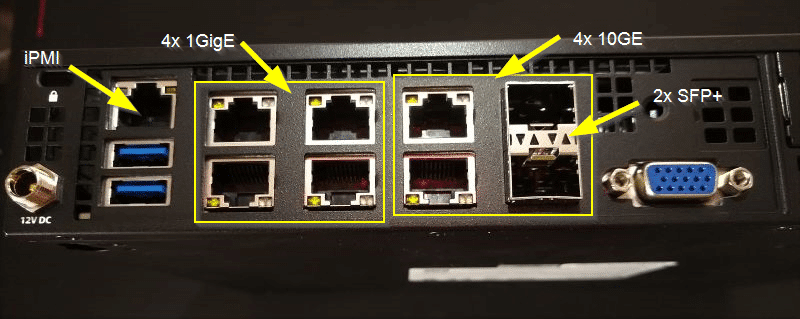
Let’s start with the rear side. As you can see in the picture, there are plenty of interfaces for such a small system. In the lower left corner there’s the 12V connector which can be fastened by a screwcap. Then there are two USB 3.0 connectors and the iPMI interface above them. The iPMI comes with console and video redirection (HTML5 or Java). No extra license needed.
Then we have 4x 1 Gbit (i350) ports and four 10 Gbit (X722) ports. Two of which are SFP+. In the lower right there’s a VGA interface. Thanks to console redirection this is not necessary. But it is good to have one in emergencies.